Why your quotes go to spam (and the exact fix, step by step)

Why your quotes go to spam (and the exact fix, step by step)
Most catering quotes land in spam because sender authentication or domain reputation is broken, not because of a dodgy subject line. Fix those two things first, and content tweaks become almost irrelevant. Before anything else, spend five minutes on these checks.
- Check the junk folder yourself. Send a test quote to a Gmail, Outlook and Yahoo account you control and see where it lands.
- Confirm SPF, DKIM and DMARC are actually configured for the domain you send quotes from, not just your website domain.
- Ask a recent client to whitelist your address if a quote genuinely went missing. It buys you time while you fix the real problem.
- Resend from an authenticated address, never from a personal Gmail or a domain with no records at all.
- Read the raw headers. Send yourself a copy in Gmail, open “Show original,” and look at the
Authentication-Resultsline. If it saysspf=failordkim=fail, you’ve found your answer in under two minutes.
Authentication and reputation problems account for the overwhelming majority of legitimate mail getting filtered, according to deliverability research from SMTP2GO. Everything below walks through how to confirm that, fix it, and stop it happening again.
Key Takeaways
Quotes land in spam primarily because of broken authentication or damaged sender reputation, and fixing those two layers resolves most cases without touching a word of copy.
| Point | Details |
|---|---|
| Check headers first | Read Authentication-Results in raw headers before assuming the problem is content or wording. |
| Fix alignment, not just records | SPF and DKIM must align with your visible “From” domain, or DMARC fails even when both checks pass. |
| Separate transactional from marketing | Use different subdomains and DKIM keys so a marketing complaint spike never drags down quote delivery. |
| Watch complaint rate, not just opens | A rising spam complaint rate is the clearest early warning of reputation damage. |
| Automate the send path | Caterflowai sends every quote through a consistent, authenticated workflow instead of ad hoc personal inboxes. |
Table of Contents
- What’s causing your quotes to end up in the spam folder?
- Getting SPF, DKIM and DMARC right for quote emails
- How to check and repair your sender reputation
- Writing quote subject lines and content that clear the filters
- ESP and sending infrastructure choices that protect quote delivery
- Testing and monitoring tools that confirm your fixes actually worked
- Recovering a damaged domain and warming it up safely
- Why deliverability is an operations problem, not a marketing one
- Get your quoting infrastructure checked properly
- Where to check your setup and run the tests
- Sources
What’s causing your quotes to end up in the spam folder?
Work through this in order. Skipping ahead to content edits before you’ve ruled out authentication wastes time and often makes no difference at all.
- Verify SPF, DKIM and DMARC, and check they’re aligned. A record existing isn’t the same as it working. The domain in your “From” header must match the domain your SPF and DKIM records authorise, or mailbox providers treat the message as unverified.
- Check domain and IP reputation. Log into Google Postmaster Tools and look at your domain reputation and spam-rate graphs. Run your sending domain through a blocklist scanner too. A domain flagged on even one blocklist can tank inbox placement for that provider.
- Read the raw headers on a test send. The
Authentication-Resultsline tells you exactly which check failed. Don’t guess. It’s written right there. - Audit your list hygiene. Are you still emailing addresses that bounced three times? Did any of your contacts come from a purchased or scraped list? Both wreck reputation fast.
- Only now, test your content. Subject lines, image ratios and links matter, but they’re the last variable to check, not the first.
Most catering businesses jump straight to step 5 because it feels like the controllable part. It’s usually the least relevant one.
Pro Tip: Keep a spreadsheet of every test send, date, and which provider (Gmail, Outlook, Yahoo) it landed in. Patterns show up fast once you’ve got three or four data points, and you’ll spend far less time guessing.
Getting SPF, DKIM and DMARC right for quote emails
SPF tells receiving servers which mail servers are allowed to send on behalf of your domain. DKIM adds a cryptographic signature proving the message wasn’t altered in transit. DMARC ties the two together and tells providers what to do when a message fails, and critically, it requires the domain in those checks to align with the domain in your visible “From” address.
That alignment requirement is where most catering businesses trip up. You might have SPF passing for mail.yourbusiness.com.au while your quotes actually go out showing quotes@yourbusiness.com.au in the From field. Mismatched domains fail DMARC even when the underlying SPF and DKIM checks technically pass.
Since 2024, Gmail and Yahoo have made this a hard requirement rather than a best-practice suggestion. Bulk senders without properly aligned SPF, DKIM and DMARC face a real risk of being blocked outright, according to Google’s own sender guidelines, and that threshold now applies at far lower volumes than most small operators assume.
Common configuration mistakes worth checking right now:
- SPF record exceeding the 10 lookup limit. Every third-party tool you’ve ever added (your accounting software, a marketing platform, an old CRM) adds a lookup. Exceed ten and SPF fails silently for everyone.
- DKIM signing with the wrong domain. Some email platforms sign with their own domain by default unless you explicitly configure a custom signing domain.
- Subdomain misalignment. A DMARC record on your root domain doesn’t automatically cover
quotes.yourbusiness.com.auunless you’ve set subdomain policy correctly.
Roll out DMARC in monitoring mode (p=none) first. This lets you collect aggregate reports showing exactly which sources are sending as your domain, legitimate and otherwise, before you switch to a stricter policy that could block real quotes if you’ve missed an authorised sender.
Pro Tip: DMARC aggregate reports arrive as XML files that are genuinely painful to read by eye. Feed them into a free DMARC report analyser rather than opening the raw file. You’ll spot a failing source in seconds instead of squinting at code.
How to check and repair your sender reputation
Sender reputation is the score mailbox providers quietly assign to your domain and IP based on how recipients treat your mail. It’s invisible until something breaks, and then it’s the single biggest lever you can pull.

Your spam complaint rate is the metric that matters most. Every time a recipient hits “report spam” instead of deleting or unsubscribing, that’s logged against your domain. Complaint rates need to stay low as even moderate issues can lead to noticeable filtering, and ongoing problems cause significant suppression across the board. Sending quotes to people who did not request them or to purchased or scraped lists often causes serious damage to sender reputation.
Google Postmaster Tools gives you a direct view of your domain reputation, IP reputation and spam-rate trend without needing a third-party tool. Pair it with a blocklist scanner to see whether your sending IP or domain shows up on any of the major block lists, which can happen even from one bad sending burst.
Practical list-hygiene steps that repair damage:
- Remove hard bounces immediately and suppress soft bounces after two or three consecutive failures.
- Never re-add a purchased or scraped list to your sending pool, even if it looks tempting for lead volume.
- Run a re-engagement pass on contacts who haven’t opened anything in six months or more, and drop the ones who still don’t respond.
- Segment your active client list from cold prospects so one bad batch doesn’t drag down deliverability for people actively waiting on a quote.
A dedicated sending IP can help once you’ve got consistent volume and a clean history, because it isolates your reputation from other senders. It won’t fix an underlying authentication or complaint problem though, and a dedicated IP with no sending history actually starts with worse reputation than a warmed shared IP until you build volume gradually.
Writing quote subject lines and content that clear the filters
Content is real, but it’s the last lever, not the first. Once authentication and reputation check out clean, these details close the gap.
Keep your subject line honest. “Your catering quote for Sarah’s wedding” outperforms anything with a fake “Re:” tacked on to look like a reply thread, or artificial urgency like “Final chance” on a first quote. Filters have gotten good at spotting manufactured urgency, and clients notice too.
Watch your text-to-image ratio. An all-image PDF-style quote with almost no actual text in the email body reads as a classic spam pattern to most filters, even when it’s perfectly legitimate. Include real body text: event date, guest numbers, menu summary, and a clear next step.
Spam-word lists such as the one ActiveCampaign maintains are worth a skim, but treat them as a final content check rather than your main strategy. Modern filters weight sender behaviour and complaint history far more heavily than any single trigger word in your copy.
A few other content details that consistently help:
- Use full, branded URLs rather than generic shorteners like bit.ly, which spam filters treat with suspicion because they hide the destination.
- Include your actual business name, ABN and contact details in the footer, not just a logo.
- Add a genuine unsubscribe or opt-out line for any quote follow-up sequence, even a short one.
- Structure the quote request clearly, mirroring how a well-written enquiry reads: event type, date, guest count and preferences all stated plainly, which also reduces confusion on the recipient’s end and cuts down on accidental spam reports.
ESP and sending infrastructure choices that protect quote delivery
Your infrastructure setup can quietly sabotage even perfectly authenticated, well-written quotes. This is the layer most catering businesses never think about until something breaks.
The single biggest fix here: separate your transactional quotes from any marketing email by using different subdomains and different DKIM keys for each. A quote sent from quotes.yourbusiness.com.au with its own DKIM signature won’t get dragged down if a marketing newsletter sent from news.yourbusiness.com.au racks up complaints. Without that separation, one bad marketing send can tank deliverability for every transactional quote you send that week, a pattern deliverability specialists at SMTP2GO flag as a recurring cause of otherwise inexplicable filtering.
A few other infrastructure checks worth ten minutes each:
- Enable List-Unsubscribe headers on any bulk notification stream, which lets Gmail and Outlook offer a one-click unsubscribe instead of a spam report.
- Check your ESP’s shared-IP neighbours if you’re on a shared sending pool. A platform with lax abuse controls means you’re sharing reputation with senders you’ve never met.
- Confirm reverse DNS is set up for your sending IP, matching the hostname your mail server presents.
- Use TLS for all outbound connections. Unencrypted mail is increasingly treated as a red flag on its own.
Testing and monitoring tools that confirm your fixes actually worked
Don’t assume a fix worked. Confirm it, in this order.
- Run a spam test through a tool like Mail-Tester, MailGenius or GlockApps before you resend to real clients. These flag authentication failures and formatting problems immediately, and MailGenius’s own guidance is explicit that a test should come before you touch a single word of copy.
- Read the raw headers. Beyond
Authentication-Results, Outlook mail carries anX-Microsoft-Antispamheader with an SCL (Spam Confidence Level) score. A high SCL score tells you Microsoft’s filter scored the message as risky, independent of whether it technically passed SPF and DKIM. - Set up DMARC aggregate reports so you get ongoing visibility instead of a one-off snapshot. These arrive weekly from participating providers and show every source claiming to send as your domain.
- Check Google Postmaster Tools weekly for the first month after any fix, then monthly once things stabilise.
A single clean test result isn’t proof of a fix. Watch your complaint rate and spam-folder placement over at least two weeks of real sending before you call it resolved. Deliverability shifts gradually as mailbox providers update their trust signals for your domain, not instantly the moment you publish a DNS record.
Recovering a damaged domain and warming it up safely
If your domain’s already in trouble, resist the urge to blast your entire list again the moment you’ve fixed authentication.
- Stop sending to the full list immediately. Isolate whichever segment triggered the problem, whether that’s a purchased list, an old CRM export, or a marketing batch that shared infrastructure with your quotes.
- Fix your SPF, DKIM and DMARC alignment, then run a spam test and check headers again before sending anything broader.
- Warm up gradually. Start by sending only to your most engaged, recently active clients, the ones who’ve opened or replied in the last month. Step up volume over one to two weeks rather than resuming full volume on day one.
- Watch your Postmaster Tools reputation graph daily during warm-up. A dip means slow down, not push through.
- Contact your ESP or ask a mailbox provider’s postmaster support if reputation stays damaged after two to three weeks of clean sending. Some domains need manual review to clear a persistent flag.
Pro Tip: Warm up with real quote sends to real prospects, not test emails to yourself. Mailbox providers weight genuine recipient engagement, opens, replies, and clicks, far more heavily than volume alone when rebuilding trust in a domain.
Why deliverability is an operations problem, not a marketing one
Most catering businesses treat a quote landing in spam as a copywriting failure. Rewrite the subject line, soften the call to action, try again. That instinct is almost always wrong, and it wastes the hours you don’t have.
The real issue sits one layer down, in DNS records, sending domains and list hygiene, none of which a better subject line touches. I’d go further: businesses that keep tweaking quote wording without ever checking their Authentication-Results header are treating a plumbing problem like a paint problem. The pipes are leaking. New paint doesn’t fix that.
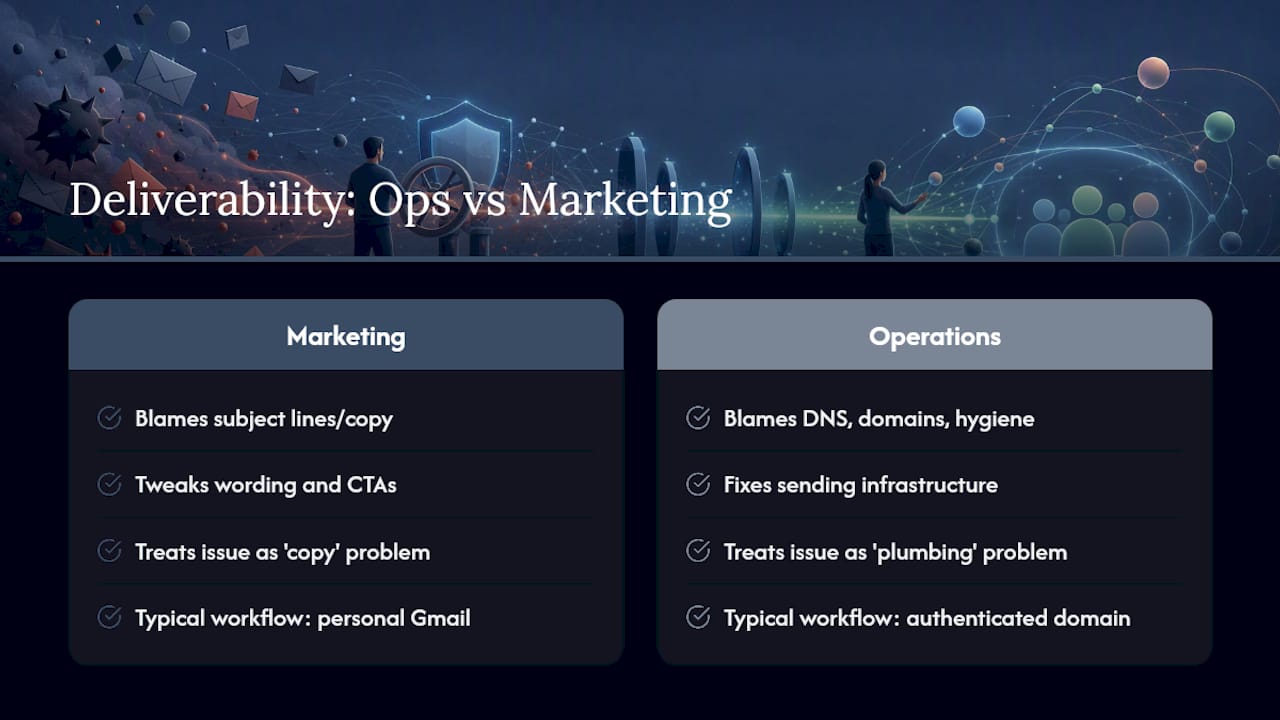
What’s underappreciated is how much manual quoting workflows contribute to this mess in the first place. A quote sent from a personal Gmail account, forwarded from three different staff inboxes, formatted differently each time, is exactly the pattern that erodes sender reputation over months without anyone noticing until a client says “I never got that.”
Automating the send path removes most of the human error that causes this. When every quote goes out from the same authenticated domain, with consistent DKIM signing and a proper branded structure every time, you eliminate the variability that quietly damages reputation. That’s not a marketing fix. It’s an infrastructure decision, and it’s one most small catering operators never get around to making until a client complains a quote never arrived.
— Tim
Get your quoting infrastructure checked properly
Caterflowai gives your quotes a fixed, authenticated sending path instead of the patchwork of personal inboxes and inconsistent templates that quietly damages deliverability over time. Every quote goes out through automated workflows built specifically for catering businesses, with consistent DKIM signing and branded formatting applied the same way, every single time, rather than relying on whoever’s sending it that day getting the setup right.
That consistency matters more than any single subject-line tweak, because it removes the human variability that causes complaint rates to creep up in the first place. Beyond quoting, Caterflowai also automates invoicing, overdue payment follow-up and post-event reporting, and connects directly with Xero, QuickBooks and MYOB so your admin doesn’t live in three disconnected systems.
If you’re not sure whether your current setup is the problem, book a free deliverability audit through Caterflowai and get a straight answer on your authentication records, sending reputation and quote workflow before you send another proposal that might never reach the inbox.
Where to check your setup and run the tests
Start with Google’s bulk sender guidelines to confirm what Gmail now requires for authentication. Run a full diagnostic against SMTP2GO’s deliverability checklist to cover reputation and list-hygiene issues, and use MailGenius for a pre-send spam test.
For a final content pass, scan ActiveCampaign’s spam-word list. If you’re running broader hospitality CRM workflows alongside your quoting, RESTOBOT’s CRM and analytics tools are worth a look too.
Sources
- Gmail bulk sender guidelines — Google Support
- Emails going to spam? Diagnose, fix, prevent — SMTP2GO
- 188 spam words to avoid — ActiveCampaign
- How to prevent emails going to spam — MailGenius