Do SMS invoice reminders actually get you paid faster?

Do SMS invoice reminders actually get you paid faster?
Yes. SMS invoice reminders work as a complement to email, and used well, they speed up payment collection. Text messages get seen within minutes, not buried in an inbox, and that immediacy translates into fewer overdue invoices and less time spent chasing.
What to expect once you switch on automated SMS reminders:
- Faster responses than email alone, because texts get read almost immediately
- Fewer manual follow-up calls from your accounts team
- A measurable drop in invoices that slip past their due date
The one thing to do next: turn on automated SMS reminders inside your billing or accounting platform, or connect an integration that does it for you. That single step removes most of the manual chasing from your week.
Key Takeaways
SMS invoice reminders work because they reach clients at a moment they can act, and automated cascading sequences that stop on payment turn that speed into consistent, lower-effort collections.
| Point | Details |
|---|---|
| SMS beats email on speed | Text messages get read within minutes, making them far more effective for urgent payment nudges. |
| Forgetfulness drives late payment | Timely SMS prompts counter this directly, according to behavioural research on reminder timing. |
| Stop-on-payment is essential | Cascading sequences must pause automatically once payment posts, avoiding awkward double messages. |
| Sender identity affects delivery | A registered, branded business number improves trust and reduces the chance of messages looking like spam. |
| CaterFlow AI matches this blueprint | It integrates with Xero, QuickBooks and MYOB, automates follow-ups, and pauses reminders on confirmed payment. |
Table of Contents
- Why SMS invoice reminders work better than email alone
- How do you set up automated SMS invoice reminders?
- What’s the right cadence and wording for SMS payment reminders?
- What are the compliance rules for SMS invoice reminders?
- How does CaterFlow AI automate invoicing and SMS follow-ups for caterers?
- What actually matters more than the tools you choose
- Ready to stop chasing invoices manually?
- Where to read more on this topic
- Sources
Why SMS invoice reminders work better than email alone
SMS beats email on one metric that matters most for getting paid: speed of attention. Text messages are read within minutes of arriving, and vendors consistently report faster payment responses through SMS billing reminders than through email alone. Email still has its place, but it isn’t built for urgency.
Late payment is often less about unwillingness and more about forgetfulness. Behavioural research shows that short, timely prompts measurably increase the chance someone follows through on a payment action — a client who intended to pay on Tuesday simply loses the thread by Thursday.
That’s the real case for SMS payment reminders. It isn’t about replacing email, it’s about catching the moment someone’s attention is actually available. Here’s where each channel earns its place:
- SMS: upcoming due-date nudges, due-day alerts, short overdue notices, and final warnings before escalation
- Email: sending the actual invoice, attaching supporting documents, and keeping a formal paper trail
Experts generally agree SMS should complement email rather than replace it — email carries the record, SMS carries the urgency. Run both, and you cover the two things that actually get invoices paid: proof and prompting.
How do you set up automated SMS invoice reminders?
Getting this running properly takes an afternoon, not a week. Here’s the sequence that works:
- Connect your billing platform. Link your accounting or payment tool, whether that’s Xero, QuickBooks, Stripe or MYOB, so reminders trigger automatically off invoice due dates rather than someone remembering to send them manually.
- Choose your sender identity. Decide whether reminders come from a dedicated business number or a short code, then complete carrier registration. A verified, branded sender identity meaningfully improves delivery rates and stops your texts looking like spam.
- Build a cascading sequence. Set reminders to fire at fixed intervals before and after the due date, and make sure the sequence pauses the moment payment lands. Platforms like Stripe already suppress a scheduled reminder if a payment has been recorded or is mid-process, which avoids the awkward double-message problem entirely.
- Test before you scale. Run the sequence against a small cohort first, and turn on delivery logging so you can catch blocked numbers or dead carriers before they cost you real invoices.
- Monitor and adjust. Most SMS billing platforms report delivery status and, where available, read metrics, so you can see which stage of the cascade is actually converting.
Pro Tip: Test your reminder flow on your own mobile number first. If the pay link doesn’t load properly or the message truncates awkwardly on a small screen, your customers will hit the exact same problem — and just ignore it.
What’s the right cadence and wording for SMS payment reminders?
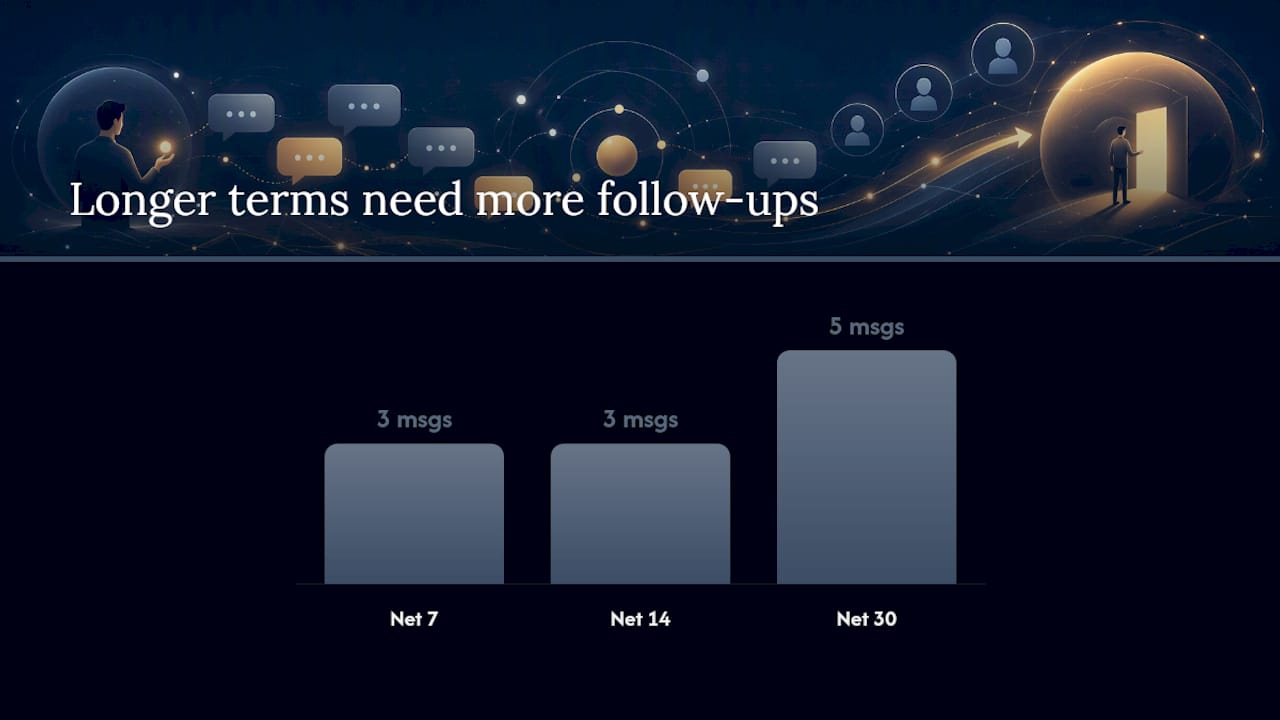
Timing matters as much as wording. A reminder sent too early gets ignored; one sent too late feels like a threat. Vendor best practice is to prioritise the two highest-impact messages first, upcoming-due and past-due, then layer in confirmations once the basics are working.
For standard terms, this cadence holds up well:
- Net 7: one reminder two days before due date, one on the due date itself, one three days after if unpaid
- Net 14: reminder three days before due, on the due date, and again five to seven days after
- Net 30: reminder five days before due, on the due date, then at 7, 14 and 21 days overdue, escalating in tone
Keep every message under 160 characters and include the client’s name, amount owed, due date and a pay link. Some template starting points:
- “Hi [Name], your invoice for $[Amount] is due [Date]. Pay now: [Link]”
- “Hi [Name], invoice #[Number] ($[Amount]) is now overdue. Settle here: [Link]”
- “[Name], this is a final notice for $[Amount], overdue since [Date]. Please contact us or pay: [Link]”
Tone should shift with age. Early reminders read as friendly nudges. Anything past 14 days overdue should sound firmer and factual, and once you hit a final notice, it’s time to pick up the phone rather than send another text.
What are the compliance rules for SMS invoice reminders?
Consent comes first. Capture opt-in when a client signs a contract, onboards, or receives their first invoice, and keep a simple record of when and how they agreed to text communication.
- Include a clear opt-out instruction in every message and handle STOP and HELP replies automatically, not manually
- Keep the wording factual and calm; aggressive language creates complaints, not payments
- Log every send and its delivery status so you have a clean audit trail if a dispute arises
- Business, including when to escalate beyond reminders
Behavioural research backs this up directly: well-timed, correctly worded prompts increase follow-through without needing to sound heavy-handed. Firm and factual outperforms aggressive every time.
How does CaterFlow AI automate invoicing and SMS follow-ups for caterers?
Catering businesses face a specific version of this problem: invoices tied to one-off events, deposits due before the job and balances due after, and client contacts who are often distracted managing their own event. CaterFlow AI builds SMS and email follow-ups around that exact workflow.
- Direct integrations with Xero, QuickBooks and MYOB mean reminders trigger straight off your existing invoicing data, no duplicate entry
- Automated follow-up sequences pause the moment a payment is confirmed, the same stop-on-payment logic covered above
- Catering operators using the platform report recovering meaningful sums from invoices that had gone overdue, alongside upwards of 10+ hours saved weekly on admin
Pro Tip: When evaluating any automation tool for your catering business, check specifically for stop-on-payment behaviour and accounting integrations before pricing. A cheap tool that double-messages a paying client will cost you more in goodwill than it saves in fees.
What actually matters more than the tools you choose
Most advice on this topic focuses on picking the “right” SMS platform, as if the software is the hard part. It isn’t. The hard part is discipline: deciding your cadence in advance, writing your templates once, and sticking to the sequence instead of manually deciding each week whether to chase a client.
Conventional wisdom oversells the channel and undersells the process. SMS invoice reminders don’t work because texting is magic, they work because they arrive at a moment when someone can actually act, and because automation removes the awkward judgement call your accounts team makes every time they debate whether it’s “too soon” to follow up again.
If you run a catering business specifically, the templates in this article will get you most of the way there. But event-based billing has its own rhythm, deposits, balances, tips that don’t fit standard Net terms, and generic reminder cadences built for retail or SaaS invoicing won’t map cleanly onto that. Build your cadence around your actual payment terms first, then automate it. Don’t automate a bad process and expect the software to fix it.
— Tim
Ready to stop chasing invoices manually?
If you run a catering business, you’ve likely tried the manual version of everything above: a spreadsheet, a calendar reminder, a text sent from your personal phone at 9pm because you remembered a deposit was due. CaterFlow AI replaces that with the exact cascade this article describes, connected directly to your Xero, QuickBooks or MYOB data, so reminders fire on schedule and stop automatically the moment a client pays.
No more guessing whether a follow-up text has already gone out, and no more sending one after the money’s already landed. The checkout-cancelled automation handles that pause for you. If overdue invoices are costing your catering business hours every week, book a demo with CaterFlow AI and see the reminder sequence running against your own invoicing data before you commit to anything.
Where to read more on this topic
Sources
- SMS timely reminders (Behavioural Economics Unit)
- Business
- Automatic reminders for one-off invoices | Stripe docs
- Mitigating late payments with automated reminders | OptiPay