Automate supply ordering: the practical framework that works
Automate supply ordering: the practical framework that works
Automating supply ordering comes down to four things working together: a replenishment engine that knows when stock is low, purchase order automation that turns decisions into paperwork without a human retyping anything, integrations that keep your ERP or accounting system in sync, and approval controls that catch mistakes before money leaves the business. Skip any one of these and you end up with automation that looks efficient on a slide but still needs someone chasing suppliers by email.
Here’s the core stack, in the order most operations teams should build it:
- Replenishment engine — calculates what to reorder based on stock levels, forecast demand, and lead times
- PO auto-generation — converts an approved reorder into a formatted purchase order without manual entry
- ERP/accounting integration — pushes and pulls data so your ordering system and your books agree
- Approval and three-way matching — routes spend for sign-off and checks the PO, invoice, and delivery match before payment
For catering businesses specifically, this stack looks different to a warehouse retailer’s. Order volumes swing with event calendars, suppliers change week to week, and margins get eaten by small errors nobody notices until reconciliation. CaterFlow AI was built around that reality, applying these same four building blocks to catering back-of-house operations rather than treating hospitality as an afterthought in a generic procurement tool.
Key Takeaways
Automating supply ordering works when a replenishment engine, PO automation, ERP integration, and approval controls with three-way matching operate as one connected system.
| Point | Details |
|---|---|
| Build the four-part stack | Combine replenishment, PO auto-generation, ERP integration, and approval controls rather than automating one piece alone. |
| Track five core KPIs | Monitor PO cycle time, exception rate, three-way match rate, stockout rate, and days of inventory from the pilot onward. |
| Start with a focused pilot | Choose high-volume or high-error SKUs first to prove value before expanding to the full catalogue. |
| Map data before connecting systems | Clean SKU lists, supplier masters, lead times, and MOQs to avoid the most common rollout errors. |
| CaterFlow AI for catering operations | Applies replenishment, PO automation, and accounting sync specifically to catering back-of-house ordering needs. |
Table of Contents
- What are the measurable benefits of automating supply ordering?
- Which automation methods and features should you deploy first?
- How should data and integrations flow for reliable automation?
- How do you implement supply ordering automation step by step?
- How does a catering-focused platform put these practices into action?
- What actually determines whether automation adoption sticks?
- Ready to automate your catering supply ordering?
- Sources
What are the measurable benefits of automating supply ordering?
The business case for automating supply ordering isn’t abstract. It shows up in three places: hours reclaimed, inventory tightened, and financial errors avoided.
Staff time is the most immediate win. Manual purchase ordering typically involves someone checking stock, emailing or calling suppliers, keying the order into a spreadsheet or accounting system, then chasing confirmation. For a mid-sized operation ordering from a dozen suppliers weekly, that’s easily several hours a week that automation removes almost entirely, freeing staff for tasks that actually need judgement rather than data entry.
Inventory improves in three specific ways once ordering runs on rules instead of habit:
- Lower carrying costs — you stop over-ordering “just in case,” which ties up cash in stock sitting on shelves
- Fewer stockouts — reorder points trigger before you run dry, rather than after a chef or event manager notices a gap
- Better turnover — stock moves through the business faster because ordering matches actual consumption patterns, not guesswork
Financial control tightens too. Three-way matching, checking that the purchase order, the supplier invoice, and the goods actually received all agree, catches pricing errors, short deliveries, and duplicate invoices before they’re paid. That single control point is often where automation pays for itself fastest, because manual invoice processing lets these errors through more often than most managers assume.
Automation adoption is accelerating across procurement in general. A Gartner survey found 80% of executives believe automation can be applied to almost any business decision, which explains why ordering automation is no longer treated as a nice-to-have for large enterprises only.
Track these KPIs from day one so you can prove the investment is working:
- PO cycle time — how long from reorder trigger to order placed
- Exception rate — the percentage of orders needing manual intervention
- Three-way match rate — the share of invoices matching cleanly without dispute
- Stockout rate — how often a needed item is unavailable when required
- Days of inventory — how long stock sits before it’s used
Which automation methods and features should you deploy first?
Not every automation technique suits every business, and the catalogue is bigger than most operations managers realise when they first start researching.
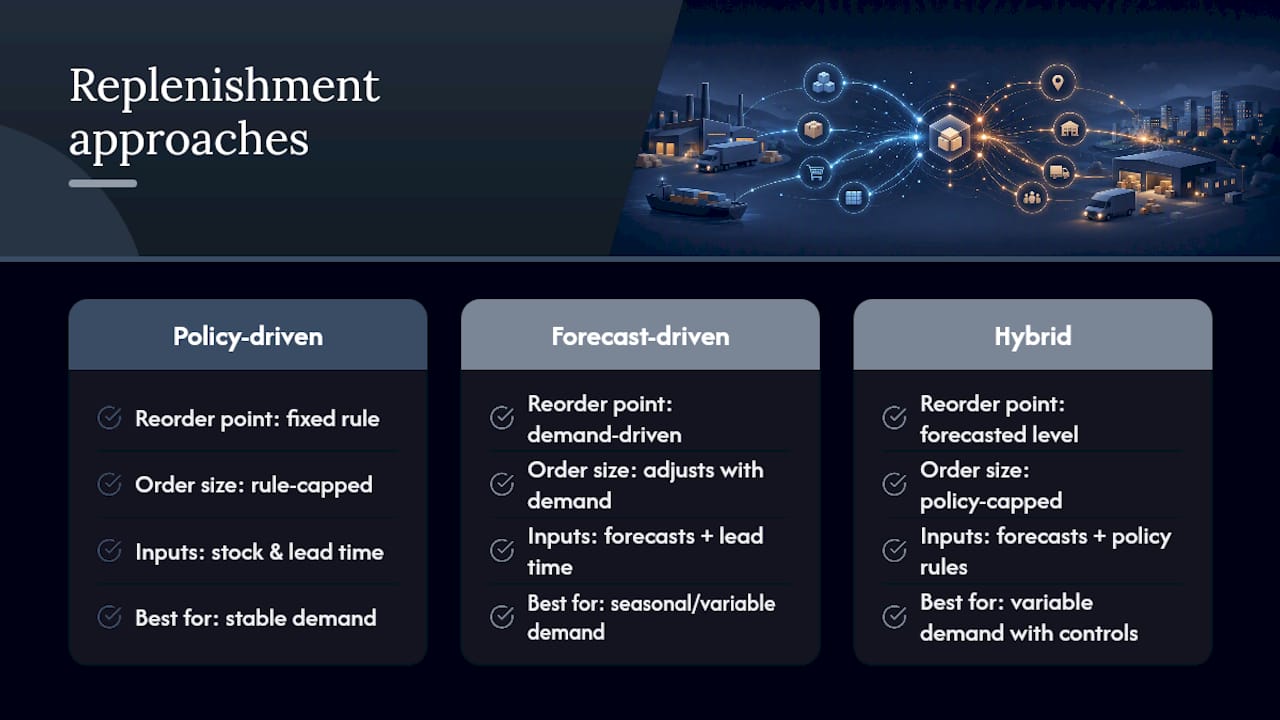
Automated replenishment comes in three flavours. Policy-driven replenishment uses fixed rules: reorder 50 units when stock hits 20. Forecast-driven replenishment adjusts for demand patterns, useful when order volume swings with bookings or seasons. Hybrid approaches blend both, using forecasts to set the reorder point but policy rules to cap order size. Platforms describing automated replenishment typically calculate reorder needs from stock levels, lead times, minimum order quantities, and service-level targets, then generate a draft PO for approval rather than firing it off unsupervised.
PO automation removes the manual step between “we need this” and “the supplier has an order.” PO automation tools auto-create purchase orders from an approved reorder or a scheduled run, validate the order against contract pricing and budget limits, and sync in real time with your ERP so nobody’s re-entering the same data twice.
Order intake automation handles the other direction: orders and confirmations coming in. Email and document-parsing tools can read an incoming purchase order or supplier confirmation, validate it against vendor records, and create a draft entry in your ERP within minutes rather than sitting in someone’s inbox until they get to it.
Three-way matching and invoice automation close the loop, checking PO, invoice, and delivery against each other automatically rather than relying on someone eyeballing three documents at month’s end.
Approval routing and exception handling decide what needs a human. Routine reorders under a set dollar threshold might flow straight through; anything above it, or anything that doesn’t match expected pricing, gets flagged for review.
Pro Tip: Don’t automate exception handling out of the loop entirely. The fastest way to lose trust in a new system is a $4,000 order that auto-approved because nobody set a threshold below that number.
Low-code platforms like Microsoft Power Automate can stitch these pieces together when a dedicated procurement platform doesn’t cover every gap, orchestrating order intake, approvals, and system syncs through configurable flows.
How should data and integrations flow for reliable automation?
Automation is only as good as the data feeding it, and this is where most rollouts stumble. Get the integration map wrong and you’ll spend more time fixing mismatched records than you saved by automating in the first place.
Four integrations matter most, in rough priority order:
- ERP or accounting platform (Xero, QuickBooks, MYOB, or similar) — this is where financial truth lives, so ordering data has to reconcile with it
- Inventory or warehouse management system — stock levels drive replenishment decisions, so this feed needs to be current, not end-of-day
- POS or sales channels — for catering and hospitality, sales and bookings data predicts consumption far better than historical averages alone
- Supplier portals — platforms like Ordermentum, which digitises wholesale ordering between suppliers and venues in Australia, show how a supplier-facing catalogue and payment layer can plug into the ordering side of the equation
Before any of that connects, map these data fields precisely: SKUs, pack sizes, supplier lead times, minimum order quantities, and cost centres. A mismatched pack size (ordering by the case when your system tracks by the unit) is one of the most common causes of “the automation got it wrong” complaints, and it’s almost always a data mapping error, not a software fault.
Decide early whether you need real-time syncing or scheduled batch updates. Real-time matters most for fast-moving perishables where a stock count that’s six hours stale leads to a bad reorder decision. Scheduled syncs, run a few times daily, are usually fine for slower-moving dry goods and packaging.
Vendor acknowledgement matters more than most teams expect. An order that’s sent but never confirmed by the supplier is a gap waiting to become a missed delivery. Build acknowledgement checks and reconciliation against delivery notes into the workflow, not as an afterthought bolted on after the first stockout complaint.
How do you implement supply ordering automation step by step?
Rolling out automation works best as a staged process, not a single switch-flip. Here’s the sequence that minimises risk while still building momentum quickly.
- Pick a pilot category. Choose SKUs with high order volume, high value, or a history of errors. These give you the clearest before-and-after comparison and the fastest proof of value.
- Set policies before you connect anything. Define safety stock levels, reorder points, service-level targets, and approval dollar thresholds. Automation without policy is just faster chaos.
- Clean your data. Audit SKU lists, supplier master records, lead times, and minimum order quantities. This step is unglamorous and frequently skipped, and it’s the single biggest predictor of a rocky rollout.
- Connect and test. Link your ERP or accounting platform, run dry-run orders that don’t actually hit suppliers, and validate that three-way matching flags the errors it should.
- Roll out in phases. Start with the pilot category, monitor closely for 30 days, then expand. Watch exception rates and PO cycle time as your early warning signals.
- Avoid the common traps. Don’t set approval thresholds so low that every order needs sign-off, and don’t skip vendor acknowledgement checks just because the pilot is running smoothly.
Timelines vary by scope. A focused pilot covering a handful of categories can go live within weeks; a full deployment across a complex inventory footprint, multiple suppliers, and legacy systems takes considerably longer. Treat vendor timeline promises as a starting estimate, not a guarantee.
| Milestone | What to check |
|---|---|
| Pilot live | PO cycle time drops and exception rate is tracked from week one |
| 30 days in | Three-way match rate stabilises and vendor acknowledgement gaps are resolved |
| — | Stockout rate and days of inventory show measurable improvement |
How does a catering-focused platform put these practices into action?
Generic procurement software solves generic problems. Catering has its own: order volumes that spike around weddings and corporate functions, ingredient lists that change with every menu, and suppliers who need confirmation fast because perishables don’t wait.
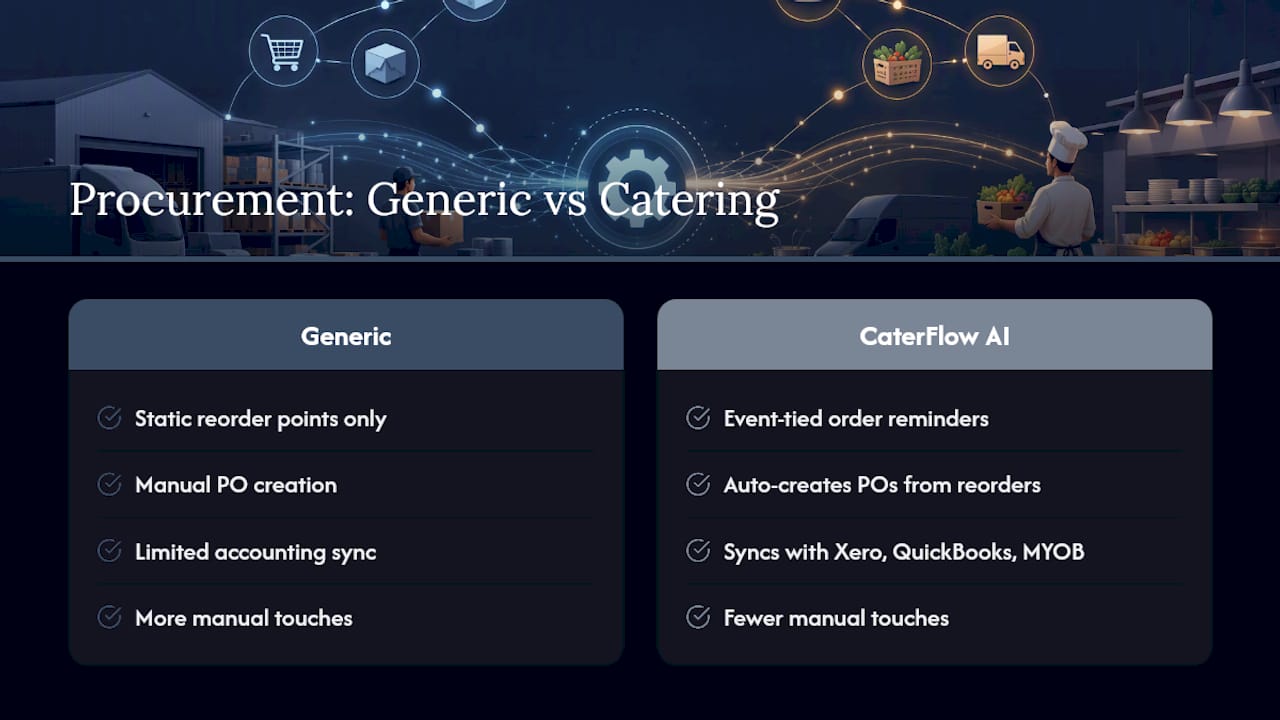
CaterFlow AI applies the replenishment, PO automation, and integration stack described above specifically to that environment. It generates supply order reminders tied to upcoming events rather than static reorder points alone, auto-creates purchase orders from approved reorders, and syncs directly with accounting platforms including Xero, QuickBooks, and MYOB so purchasing data lines up with the books without double entry.
The same automation logic that recovers admin hours on quoting and invoicing extends naturally to ordering: fewer manual touches, fewer chances for a supplier order to fall through the cracks during a busy week.
The pattern holds across every back-of-house task we’ve automated: the time saved isn’t just administrative relief, it’s the difference between a caterer chasing paperwork after hours and one who’s actually present for the next client conversation.
Specific case studies and before-and-after figures for supply ordering automation within CaterFlow AI are being compiled as more catering businesses complete their rollout, and will be added here as that data becomes available.
What actually determines whether automation adoption sticks?
Most automation rollouts fail quietly. Not with a dramatic system crash, but with staff sliding back into the old spreadsheet three months in because nobody built the habit properly during the pilot.
The businesses that make automation stick treat the first 30 days as a discipline exercise, not a technology exercise. They pick one supplier category, get the policy settings right before they worry about the software, and resist the urge to automate every exception away. A pilot that runs quietly and correctly for a month builds more trust than a full rollout that impresses everyone in week one and breaks in week three.
If you’re weighing this for your own operation, start smaller than feels comfortable. Reach out for a demo or a free audit before committing to a full rollout, and treat the first month as proof, not performance.
— Tim
Ready to automate your catering supply ordering?
Most procurement platforms are built for warehouses and manufacturers, not for a caterer juggling three events this weekend and a supplier who needs confirmation by 4pm. Caterflowai was built the other way around: catering-specific workflows first, with supply order reminders, automatic purchase order generation, and direct sync to Xero, QuickBooks, and MYOB baked in from the start rather than bolted on.
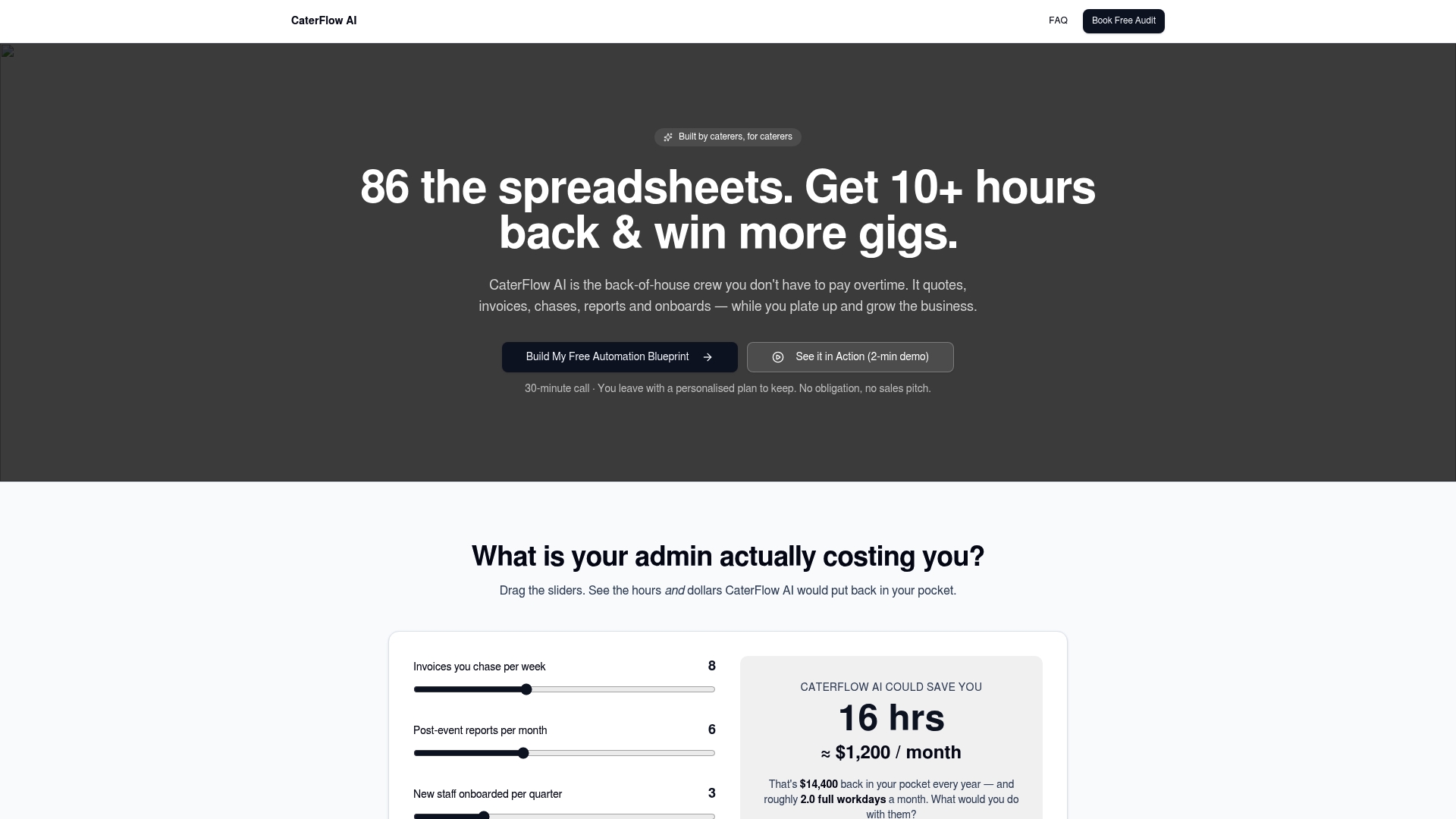
That means less time reformatting supplier emails into spreadsheets and more time actually running the kitchen. If the framework in this article sounds right for your business but building it yourself feels like a bigger project than you have hours for, CaterFlow AI applies it out of the box. Book a free audit to see exactly where your current ordering process is leaking time, and what automating it would look like for your operation specifically.